How DeepRit works
What each part does, what happens when you press send, and what makes the biggest difference to your results.
The idea in one minute
Most AI tools start from nothing every time you open them, so you explain who you are, paste your details and fix the tone again and again. DeepRit keeps that knowledge in three places, so a request can be as short as "a post about Saturday's rye":
- Your profile holds what's true about you and your business everywhere.
- Your data holds the specifics: menus, price lists, past work, policies.
- Your writers hold how a particular kind of content should be written.
You build these once. After that, you just ask.
What happens when you press send
- Check for a repeat. If you've made exactly this request before, the saved answer comes back for zero tokens. Regenerate skips this step.
- Search your data. Your browser searches only the groups this writer imports and picks the passages that match. This costs nothing.
- Pick the relevant facts. Your profile is split into individual facts, and only those related to the request are used.
- Assemble the request. The writer's voice and rules, those passages and facts, and your chosen format and length go together, within your budget.
- The AI writes. The result streams onto the page as it's written.
- A free cleanup. A local check removes part labels and stray blanks, repairs headings and numbering, and holds the result to your format.
- An image, if you asked for one. It's described from the post and your writer's image settings. Your logo is placed locally, not drawn by AI.
Your profile
What it does: gives every writer the facts about you, such as your name, role, company, offer, audience, voice and guardrails.
How to use it: fill in the parts that keep coming up in your writing. You can switch the profile off everywhere, by section, for a writer, or for one document. A contract writer may need your company's details, and a personal essay may not.
Your data
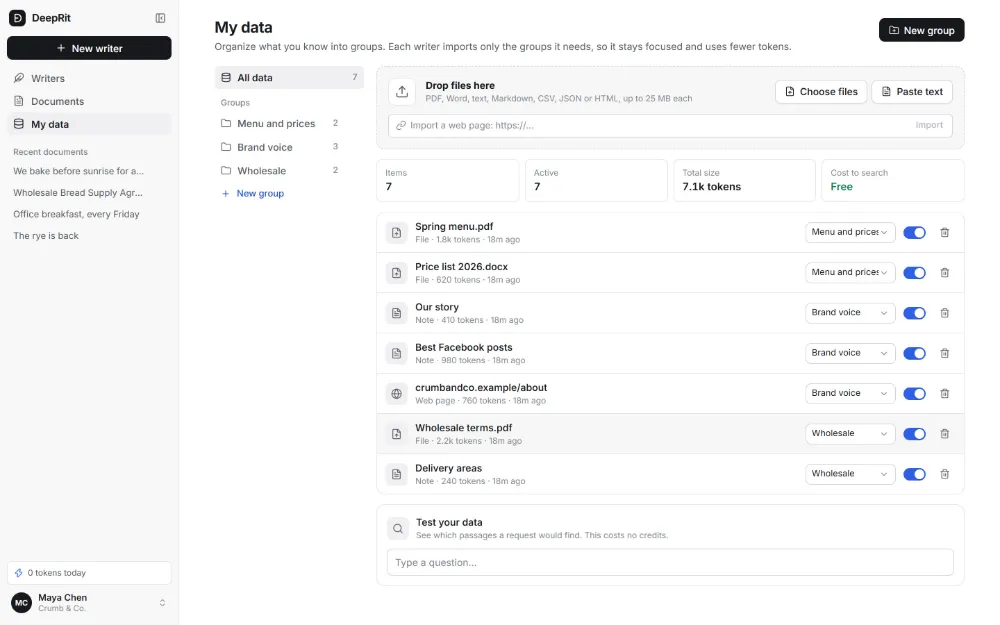
What it does: gives writers specific knowledge to draw from. Add PDF, Word, text, Markdown, CSV, JSON and HTML files, web pages by link, and notes you paste in.
How to use it: sort it into groups by topic, such as "Menu and prices", "Brand voice" and "Wholesale". Each writer imports only the groups it needs, which keeps results focused and uses fewer tokens. Use Test your data to see which passages a request would find, at no cost, before you rely on them.
Your writers
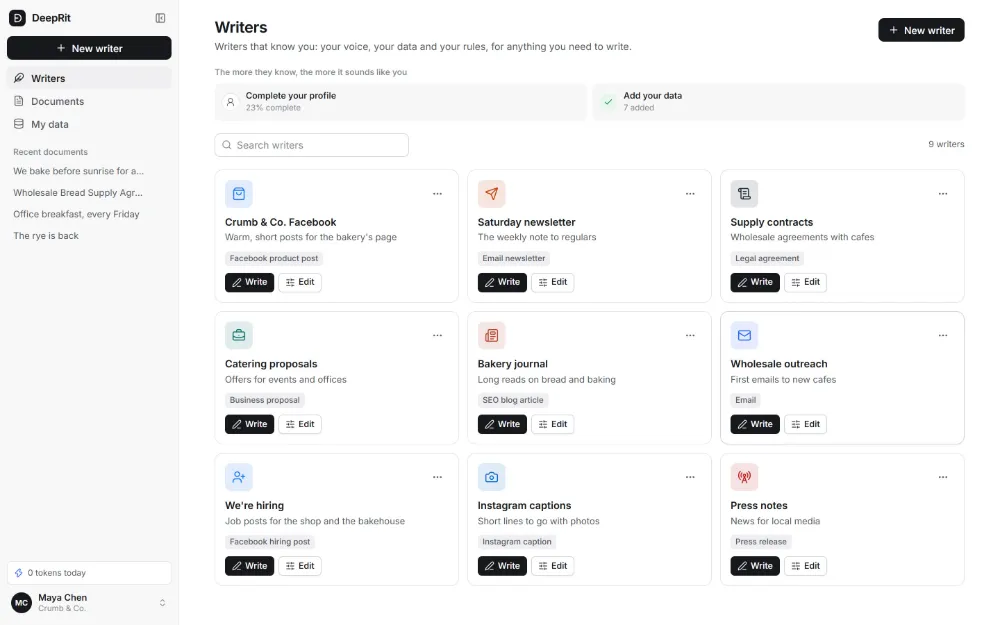
A writer is a saved specialist for one kind of content. Describe what you want in a sentence and AI sets it up, or start from one of 153 templates. Every part stays editable, by hand or by telling the assistant what should change.
| Part | What it controls |
|---|---|
| Identity | Its name, icon, and what it's for. |
| Voice | Tone, formality, warmth and energy. A writing sample is analysed once into a short style note. |
| Data | Which groups it imports, and anything only this writer should know. |
| Rules | The structure to follow, things to always do, and things never to say. |
| Document style | Fonts, headers, numbering, letterhead and signature blocks. |
| Images | Style, size, brand colors and logo, or off for this writer. |
| Test | Try a real request before you save. Nothing changes until you press Save. |
The editor
This is where you write. The panel on the left talks to your writer, and the page on the right is your document.
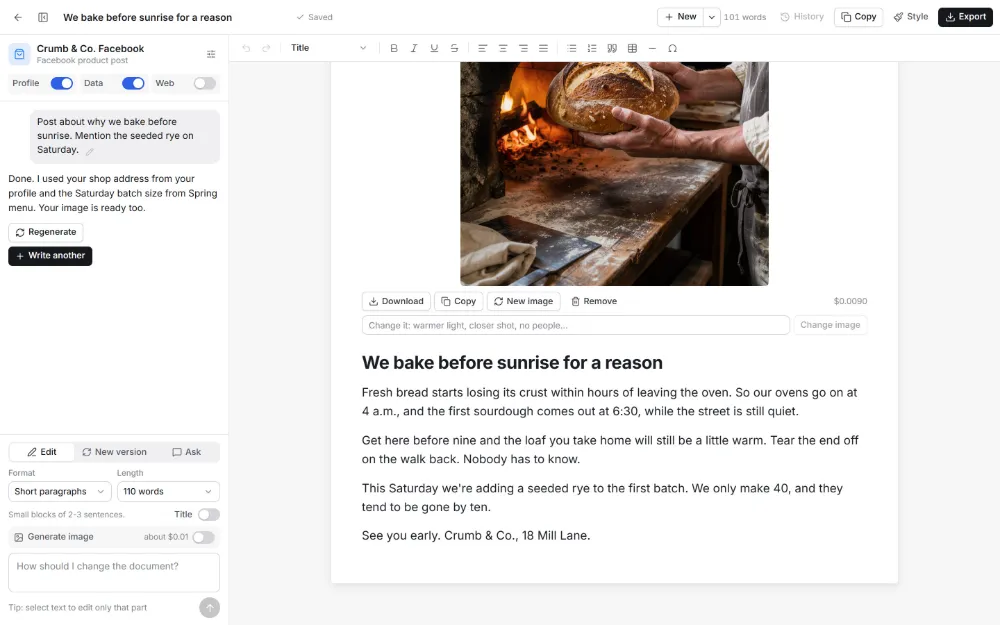
- Edit changes the current document. New version rewrites it from your new instruction. Ask answers a question about it without changing anything.
- Format and Length are chosen with each request: 14 formats, a word count or flexible length, with or without a title.
- Profile, Data and Web switches decide what this document can draw on. Web is off by default.
- Select any text and ask for a change to edit only that passage. It's the cheapest kind of edit.
- Copy keeps your title, bold and lists when you paste elsewhere. Export gives you PDF, Word, HTML or Markdown.
- History keeps earlier versions, so you can try things freely.
How to get better results
These make the biggest difference, roughly in this order:
- Give it a real writing sample. Paste a few things you've written and liked. Nothing changes the voice more. Choose your best work, because it will copy your habits, good and bad.
- Add the facts it keeps getting wrong. If you keep correcting a price or a claim, put it in your data once instead of fixing it every time.
- Keep writers narrow. "Facebook posts for the bakery" beats "marketing for the bakery". Build a second writer before stretching the first.
- Separate your data into groups. A writer that only imports what it needs finds better passages and spends less.
- Write rules from real mistakes. When a draft annoys you, turn that into a rule, such as "never open with a question". Specific rules work far better than "be engaging".
- Say what's new in your request. Your writer knows the background. Tell it the one thing it can't know: what's happening today, and who it's for.
- Pick the format before you send. It's cheaper than asking for a rewrite into a new shape.
- Edit by selecting. Fix one weak paragraph instead of regenerating the whole piece.
- Teach the writer, not just the draft. If a change should apply next time, tell the assistant in the writer's settings, not just the document.
- Always read before you publish. AI can be confidently wrong. Have a qualified professional review contracts and anything legal, medical or financial.
Your key, and how it keeps costs low
On Pro, you bring your own API key from OpenRouter. Your text and image requests run on that key, so OpenRouter bills you directly at its own rates. DeepRit charges a flat $15 a month and adds no markup, so every token saved is money you keep. See Pricing.
That's why most of the thinking happens on your device, for free, before anything goes out. Search, fact selection and the formatting cleanup all run locally. Each message shows the tokens it used. In Settings, you can choose how much context to send: Eco, Balanced or Deep. Images are off until you ask for one, so a text draft never pays for a picture.
What DeepRit doesn't do
- It doesn't post for you. You decide what goes out, and you publish it yourself.
- It doesn't replace professionals. Its contracts are first drafts for a lawyer to review, and its signatures aren't certified e-signatures.
- It doesn't create images of real people without their consent, and our Terms forbid deepfakes and impersonation.
Next, read how to train AI on your brand voice, or see all 153 templates.